
 https://jamaican3dmodels.com/
 Join our Discord
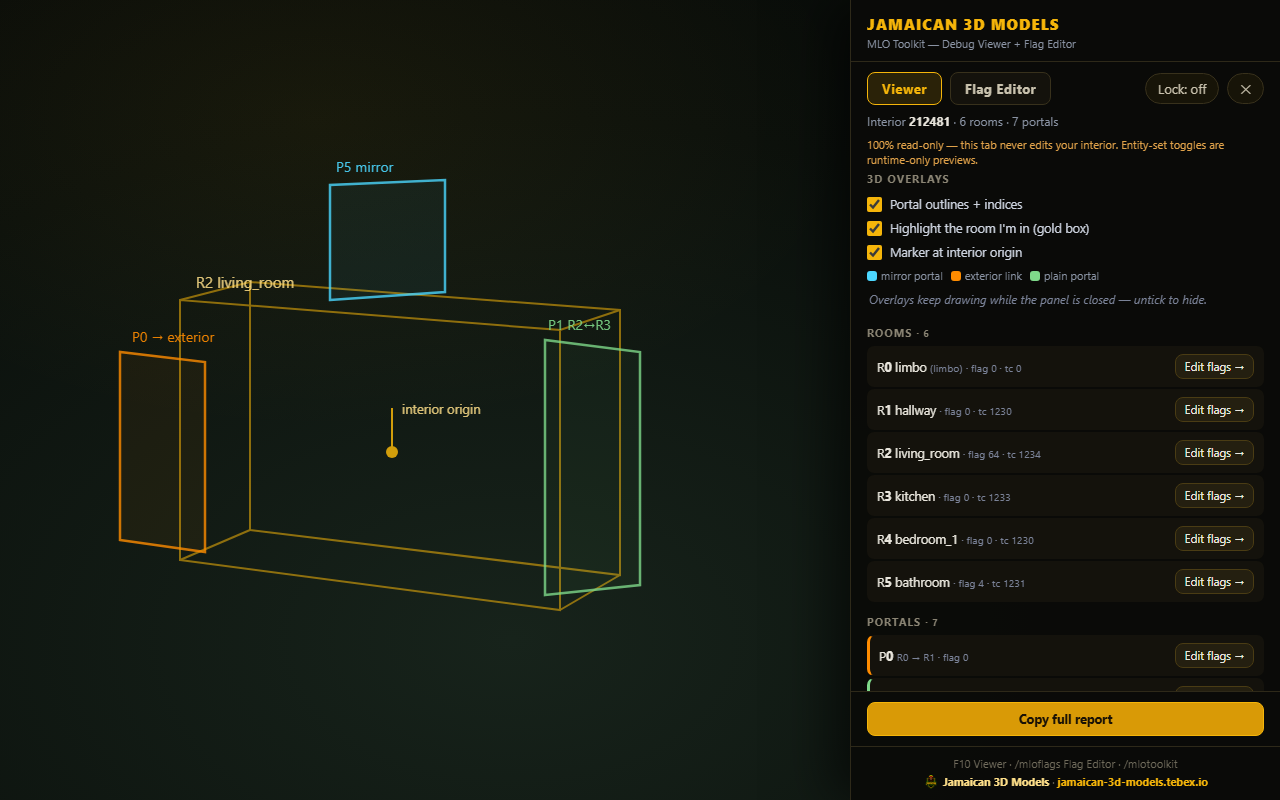
See the problem, fix the problem: the complete MLO interior workflow in one panel — a read-only Debug Viewer and a live Flag Editor, tabbed together.
VIEWER tab (F10): stand in any interior and see everything — interior ID, rooms with decoded flag bits and timecycles, every portal with flags and corner positions drawn in 3D (colour-coded: mirrors, exterior links), entity-set tester, one-click diagnostics and a copy-paste report with exactly what you need to fix your ytyp.
FLAG EDITOR tab (/mloflags): change room and portal flags LIVE with instant refresh — checkboxes per bit plus one-click presets (door, window, mirror, exterior). Watch the mirror start reflecting or the room seal in real time, then copy the final number straight into CodeWalker or Sollumz. Every room/portal row in the Viewer has an "Edit flags" jump straight to the editor with that item pre-selected.
No more export/re-import loops. Works with ANY MLO. Standalone — QBCore, Qbox, ESX Legacy or vanilla. Conflict-audited default keys.
FEATURES:
- Debug Viewer: rooms, portals, decoded flags, 3D overlays, entity sets, diagnostics
- Flag Editor: live room & portal flag editing with instant refresh + presets
- "Edit flags" jump from any Viewer row to the editor, pre-selected
- Copy-paste report + copy flag totals for CodeWalker/Sollumz
- Works with any MLO — yours or anyone's
- Standalone, read-only-safe viewer; F10 toggle, rebindable